From circuits to code

EUGENIO AMON JR. - Frontend Developer


"Hi! I am ..."

Eugenio Amon Jr.

Electrical Technologist turned Front-End Developer. Building deterministic, high-performance web interfaces with a hardware engineer's mindset. My coding roots run deep — from solving complex engineering case studies in C and Turbo Pascal during college to crafting modern web applications today. Full-stack bound.
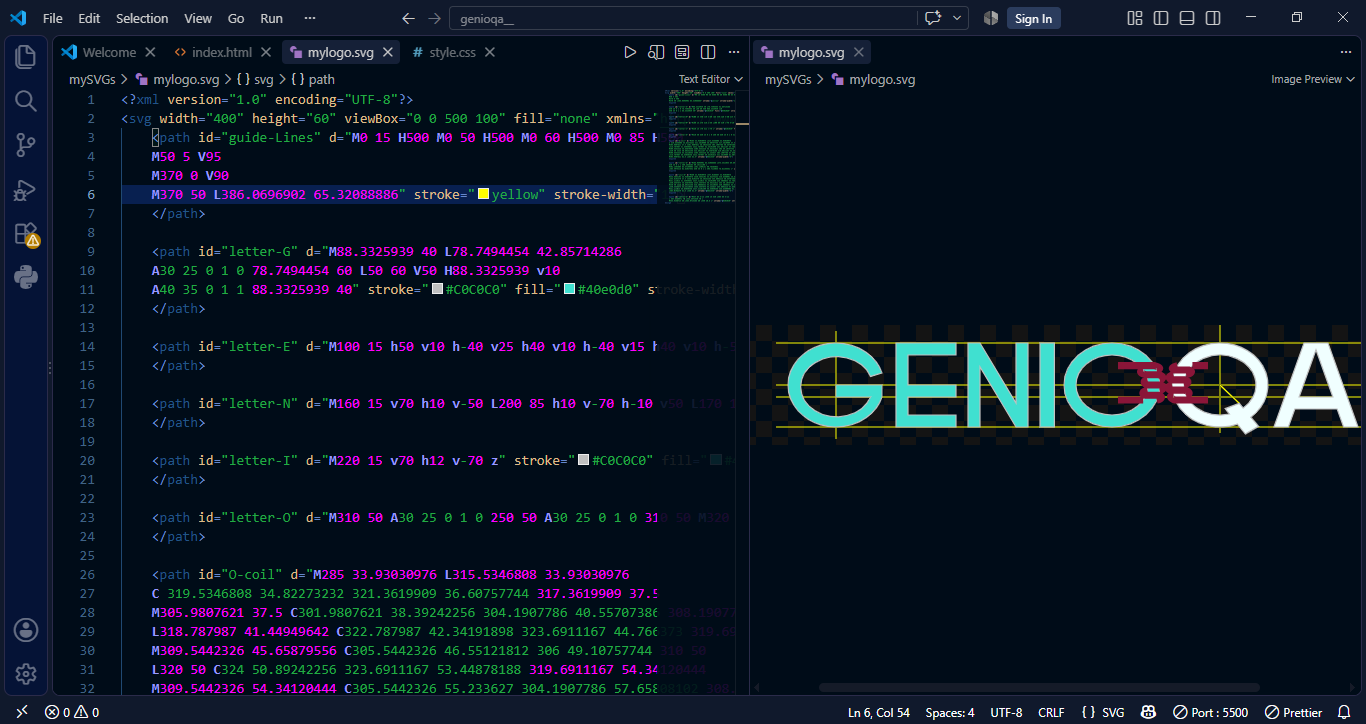

How I Built My Portfolio Logo Using SVG and VS Code


Code, Culture, and Circuits: Crafting My SVG Portfolio Logo in VS Code

A portfolio logo should be more than just a random graphic; it should tell a story. When it came time to design mine, I wanted something that was lightweight, infinitely scalable, and deeply personal.


Instead of using traditional design software, I wrote my logo from scratch using Scalable Vector Graphics (SVG) right inside Visual Studio Code.


The result is GENIOQA, a design that bridges my roots in the Philippines, my 15-year career journey in Qatar, and my professional evolution from hardware to software.

Screenshot of my logo and its code in VS Code


The Story Behind the Design: Merging Identity and Domain


Lusail City

The logo itself is clean and typographic, spelling out "GENIOQA".

This specific combination serves three meaningful purposes:


  • The Digital Address: It matches my exact domain name and portfolio URL.
  • The Cultural Connection: While I am originally from the Philippines, I have been living and working in Qatar for almost 15 years now. Including "QA" (the first two letters of Qatar) is a visual token of appreciation for the place that has shaped my life and career.


Why I Coded It: Performance & Precision in VS Code


As a developer, writing raw SVG code directly in an IDE like VS Code offered unique advantages over exporting an image from an editor:

  • Performance: Because raw SVG is just lines of XML code, the file size is microscopic. My logo loads instantly without dragging down page speeds.
  • Pixel-Perfect Sharpness: SVGs are math-based coordinates. Whether someone views my portfolio on a massive 4K monitor or a compact mobile screen, the text and shapes stay flawlessly crisp.
  • Semantic Control: Writing it by hand allowed me to keep the DOM clean, omitting the messy, auto-generated metadata that visual editors leave behind.


Engineering Meets Code: Blueprint Accuracy


To reinforce my unique engineering background, I didn't stop at the typography and coils. I wanted the canvas itself to reflect the mindset of an engineer. Behind the text and circuits, I added a few thin, subtle background lines resembling technical drawing guidelines.

In engineering, these layout lines ensure absolute precision before a blueprint is finalized. In my logo, they serve a dual purpose:


Behind the Code: How It Was Built in VS Code


Writing raw SVG code directly in an IDE like VS Code offered massive performance advantages. The file size is microscopic, allowing my site to load instantly while staying pixel-perfect on everything from tiny mobile screens to 4K monitors.


Here is the exact structural framework of how I mapped out the technical blueprint lines, text, my mathematical inductor paths, and an integrated CSS keyframe animation that makes the circuits pulse like a live current when a user hovers over the logo: